Document the job. Run the crew. Keep clients in the loop. For less.
CompanyCam is great for jobsite documentation. But running your business takes more than photos.
FieldOpsPro brings together jobsite photos, videos, reports, scheduling, crew management, client communication, estimates, invoices, and more in one affordable platform.
Just $10 per user/month.One plan with every feature.
For a 5-person crew, that is $127 less every month, or $1,524 a year, compared with CompanyCam Crew on annual billing.
Monthly cost by team sizeFieldOpsPro vs. CompanyCam Crew, billed annually (monthly equivalent)
FieldOpsPro
CompanyCam Crew
3 users
Save $89/mo (75%)
$30/mo
$119/mo
5 users
Save $127/mo (72%)
$50/mo
$177/mo
10 users
Save $222/mo (69%)
$100/mo
$322/mo
Monthly cost by team size
Team size
FieldOpsPro
CompanyCam Crew
FieldOpsPro saves
3 users
$30 per month
$119 per month
Save $89/mo (75%)
5 users
$50 per month
$177 per month
Save $127/mo (72%)
10 users
$100 per month
$322 per month
Save $222/mo (69%)
How we calculated this: CompanyCam Crew figures are monthly equivalents of annual billing: $119/month including 3 users, plus $29/month per additional user. Billed month to month, Crew is $149/month plus $34 per additional user. FieldOpsPro is $10 per user per month, billed monthly, no annual contract. Taxes and add-ons excluded. CompanyCam prices as published at companycam.com/pricing on October 6, 2026. Source [1]
FieldOpsPro vs. CompanyCam: More Than Jobsite Photos
Both platforms help contractors document their work. FieldOpsPro goes further by bringing scheduling, crew management, customer communication, and daily business operations into the same platform.
$10 per user/month. One plan, every feature, month to month.
Tiered: Core $63, Crew $119, Scale $249/month billed annually ($79, $149, $299 monthly), plus $29–$34 per added user[1]
CompanyCam is a capable documentation platform with things FieldOpsPro does not offer, such as 60+ integrations and a marketing add-on. The difference is what comes in one plan: FieldOpsPro puts documentation, the crew schedule, timesheets, the client portal, and invoicing in the same app at one per-user price.
Stop paying for multiple apps to run one crew.
One app for your jobs, your crew, and your clients.
Powerful jobsite documentation is just the beginning.
One app for your jobs, your crew, and your clients. Here is what that looks like day to day.
01Document every job
Great documentation without the complicated workflow.
Your crew takes the photo. FieldOpsPro puts it on the right job, stamps who took it and when, and backs it up. Turning those photos into something a customer or adjuster can use takes a few taps.
Photo and video captureTimestamped and synced to the job, even after a dead zone.
Organized by jobEvery photo, note, and document lives on the job it belongs to.
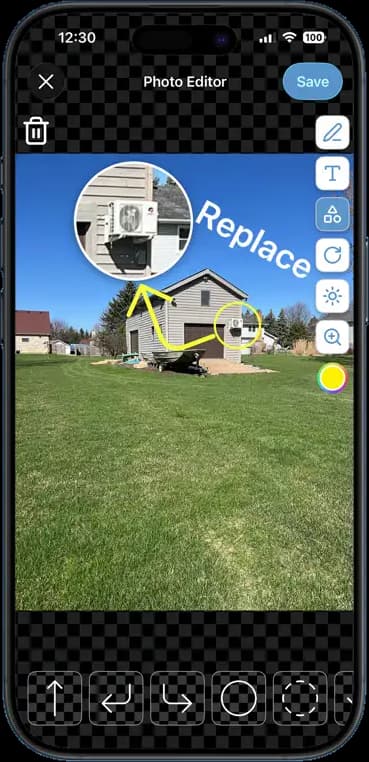
Photo markupArrows, shapes, text, and zoom callouts on any job photo.
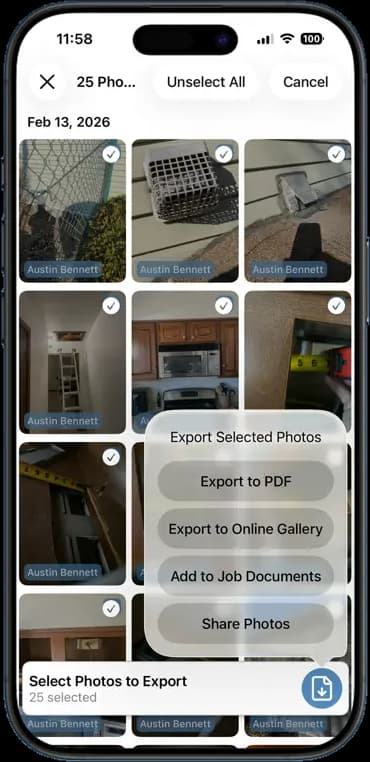
PDF reports and galleriesBranded photo reports and gallery links that open in any browser.
Your jobsite documentation and your schedule belong together.
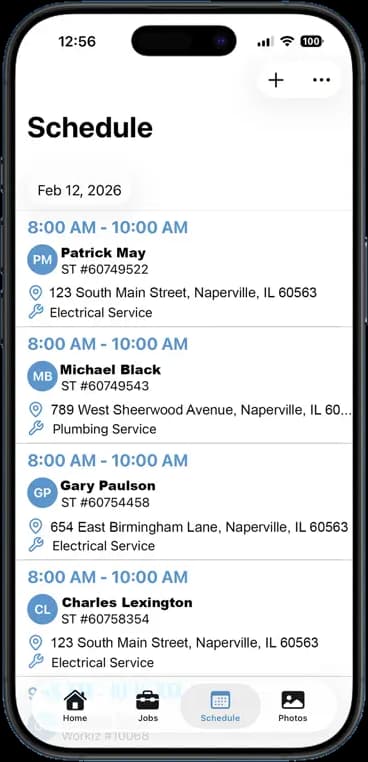
Build the schedule once and every crew member sees their day on their phone. The photos, notes, and hours they log land on the same job you scheduled, so the office never has to piece it together.
The biggest difference. As of September 22, 2026, CompanyCam's team said it does not offer a native crew calendar. It offers project assignment, tasks, and Google Calendar sync instead.[3] FieldOpsPro was built around one.
Calendar schedulingDay, week, and month views on the web and in the app.
Crew assignmentsPut one person or the whole crew on a job.
Recurring jobsRepeat jobs weekly or monthly for maintenance and repeat work.
Team coordinationTeam chat and job updates in the same app as the schedule.
The FieldOpsPro client portal is included with every account. Customers sign in to see their jobs and whatever you choose to share, so you stop forwarding photos one text at a time.
Client accessCustomers sign up with the email on their customer record.
Shared photos and videosOnly the shots you choose to share, with their captions.
Estimates and invoicesCustomers approve estimates and pay invoices online.
Client messagingCustomers message your company from the iPhone and Android apps.
Client messages stay separate from your crew's team chat.
Client portalWhat your customers can see and do
Their jobsStatus, dates, and address for each job
Shared photos and videosOnly what you share, nothing else
EstimatesReview, then approve or decline online
Invoices and billingSee what's owed and pay online
MessagesMessage your company from the mobile app
NotificationsWhen you share photos or send paperwork
You choose which jobs and photos appear. Job notes and your team stay private.
04Run the business, not just the jobsite
From scheduling to invoicing, keep everything connected.
CompanyCam has added invoicing, payments, and proposals to its plans. FieldOpsPro puts that paperwork next to your schedule, timesheets, and client portal, in one plan at one price.
EstimatesCustomers approve online, then it becomes an invoice.
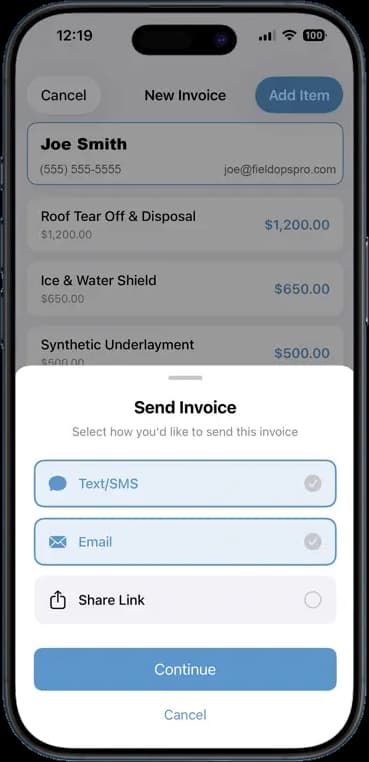
InvoicesSend by text, email, or link before you leave the driveway.
PaymentsCard payments through your connected Stripe or Square account.
TimesheetsGPS clock-in and clock-out, tied to the job.
Customer managementEvery customer's jobs, photos, and history in one record.
The schedule, tooThe job you invoice is the job you scheduled.
Pick your team size. We'll compare FieldOpsPro with CompanyCam's Crew plan using CompanyCam's published prices.
Your team size
5users
330
FieldOpsPro
$50/mo
5 users × $10, billed monthly
CompanyCam Crew
$177/mo
$119 for 3 users + 2 × $29, billed annually
Your crew could save
$127/mo
72% less
That's $1,524 a year.
Estimates only. CompanyCam Crew includes 3 users at $119/month billed annually or $149/month billed monthly, plus $29 or $34 per additional user per month. Annual figures are monthly equivalents of a yearly charge, and actual billing terms differ. Taxes and add-ons are not included.
If you want jobsite photo documentation plus the tools to run your crew, yes. FieldOpsPro covers photos, video, markup, PDF reports, and gallery links, and adds a built-in crew schedule, timesheets, estimates, invoices, team chat, and a client portal for $10 per user per month. If photo documentation is all you need, or you depend on CompanyCam's 60+ integrations, CompanyCam remains a capable choice. Compare the features side by side or browse every FieldOpsPro feature.
How much does FieldOpsPro cost compared to CompanyCam?
FieldOpsPro is $10 per user per month, billed monthly, with every feature included. CompanyCam lists its Crew plan at $119 per month billed annually ($149 billed monthly), including 3 users, plus $29 per additional user per month on annual billing ($34 monthly). For a 5-person team, that is $50 a month with FieldOpsPro versus $177 a month with CompanyCam Crew on annual billing. CompanyCam prices as published on October 6, 2026. Calculate your crew's savings.
Does FieldOpsPro support jobsite photo and video documentation?
Yes. Your crew captures timestamped photos and videos in the app, and they sync to the right job on their own. Mark up photos with arrows, shapes, and text, then share them as a PDF report, an online gallery link, or through the client portal. See photo and video sync, photo markup, and photo exports.
Can I schedule my crew using FieldOpsPro?
Yes. FieldOpsPro includes a built-in crew schedule with day, week, and month views. Assign one or more crew members to each job, set jobs to repeat weekly or monthly, and each person sees their schedule on their phone. As of September 2026, CompanyCam's team said it does not offer a native crew calendar. See how job scheduling works.
Does FieldOpsPro offer a client portal?
Yes. Every FieldOpsPro account includes a client portal at no extra cost. Your customers sign up with the email address on their customer record to see their jobs, the photos and videos you choose to share, and their estimates and invoices. They can approve estimates, pay invoices online once you connect a payment account, and message your company from the FieldOpsPro iPhone or Android app. You decide which jobs and photos they see.
Can I create estimates and invoices in FieldOpsPro?
Yes. Build estimates and invoices on your phone or computer and send them by text, email, or link. Customers can approve estimates online, and an approved estimate turns into an invoice without retyping. Connect a payment account such as Stripe or Square and customers can pay by card online. See invoicing and estimates.
Can I try FieldOpsPro without a credit card?
Yes. The 14-day free trial includes every feature and does not require a credit card. If you decide to stay, it is $10 per user per month with no contract, and you can cancel anytime. Start your free trial.
Can I use FieldOpsPro on both iPhone and Android?
Yes. FieldOpsPro has apps for iPhone and Android, plus a web app for the office. Everyone works from the same jobs, schedule, and photos on whatever device they carry. LiDAR room scanning needs an iPhone or iPad Pro with a LiDAR sensor.
Your Crew Deserves More Than Another App.
Keep your job documentation, schedules, clients, and business operations connected with FieldOpsPro.
CompanyCam Crew figures are monthly equivalents of annual billing: $119/month including 3 users, plus $29/month per additional user. Billed month to month, Crew is $149/month plus $34 per additional user. FieldOpsPro is $10 per user per month, billed monthly, no annual contract. Taxes and add-ons excluded. CompanyCam prices as published at companycam.com/pricing on October 6, 2026.
FieldOpsPro details reflect the product as of the same date. LiDAR scanning requires an iPhone or iPad Pro with a LiDAR sensor. Client portal messaging is available in the FieldOpsPro iPhone and Android apps. Online payments require a connected payment account.
CompanyCam is a trademark of its respective owner. FieldOpsPro is not affiliated with or endorsed by CompanyCam. Pricing and features are based on publicly available information and may change.