
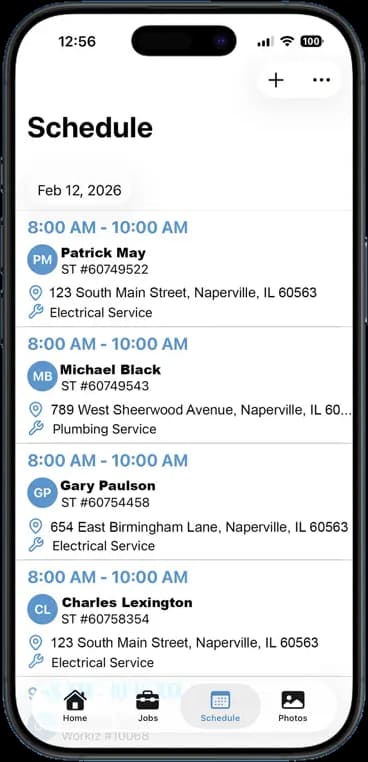
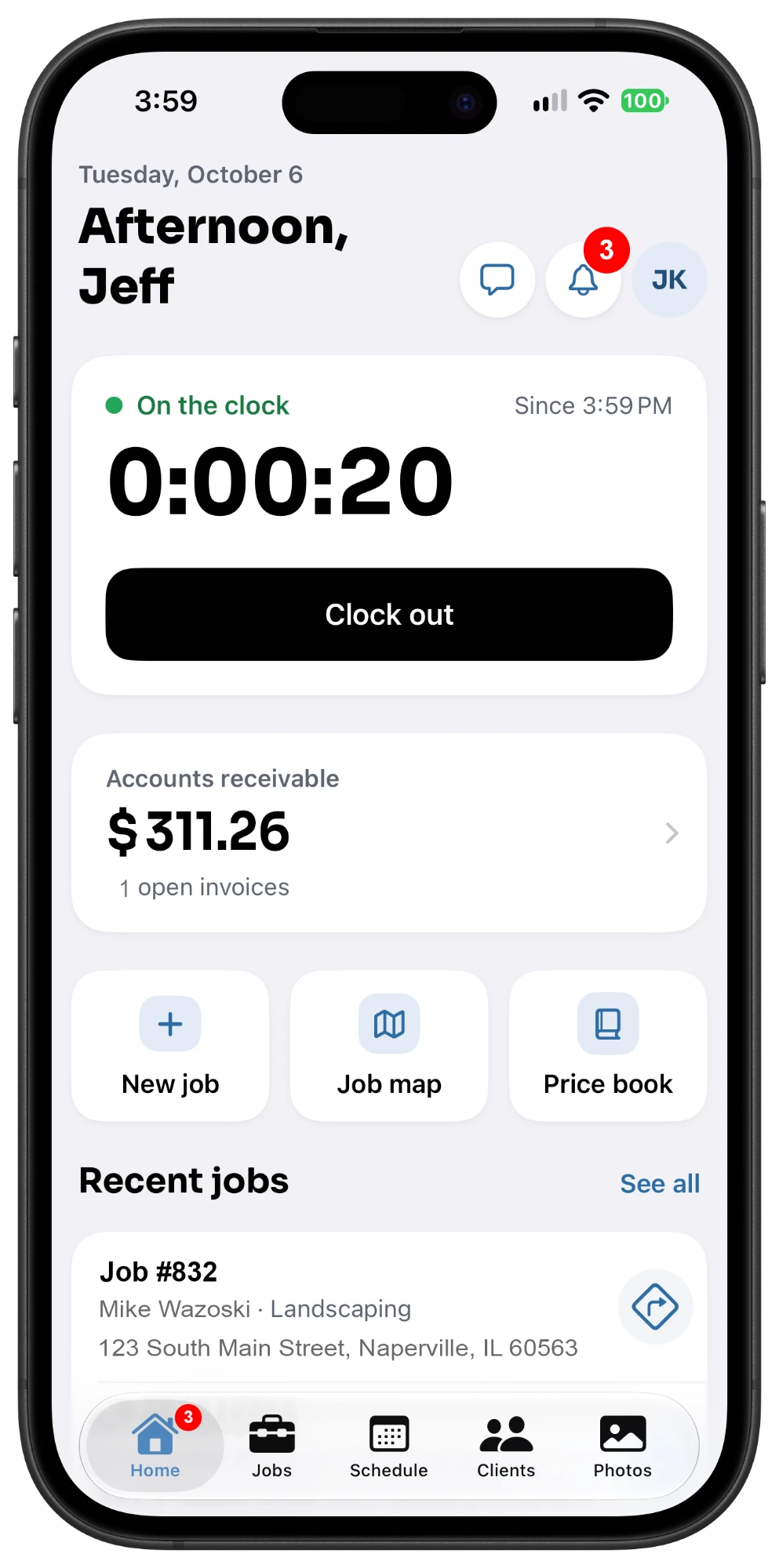
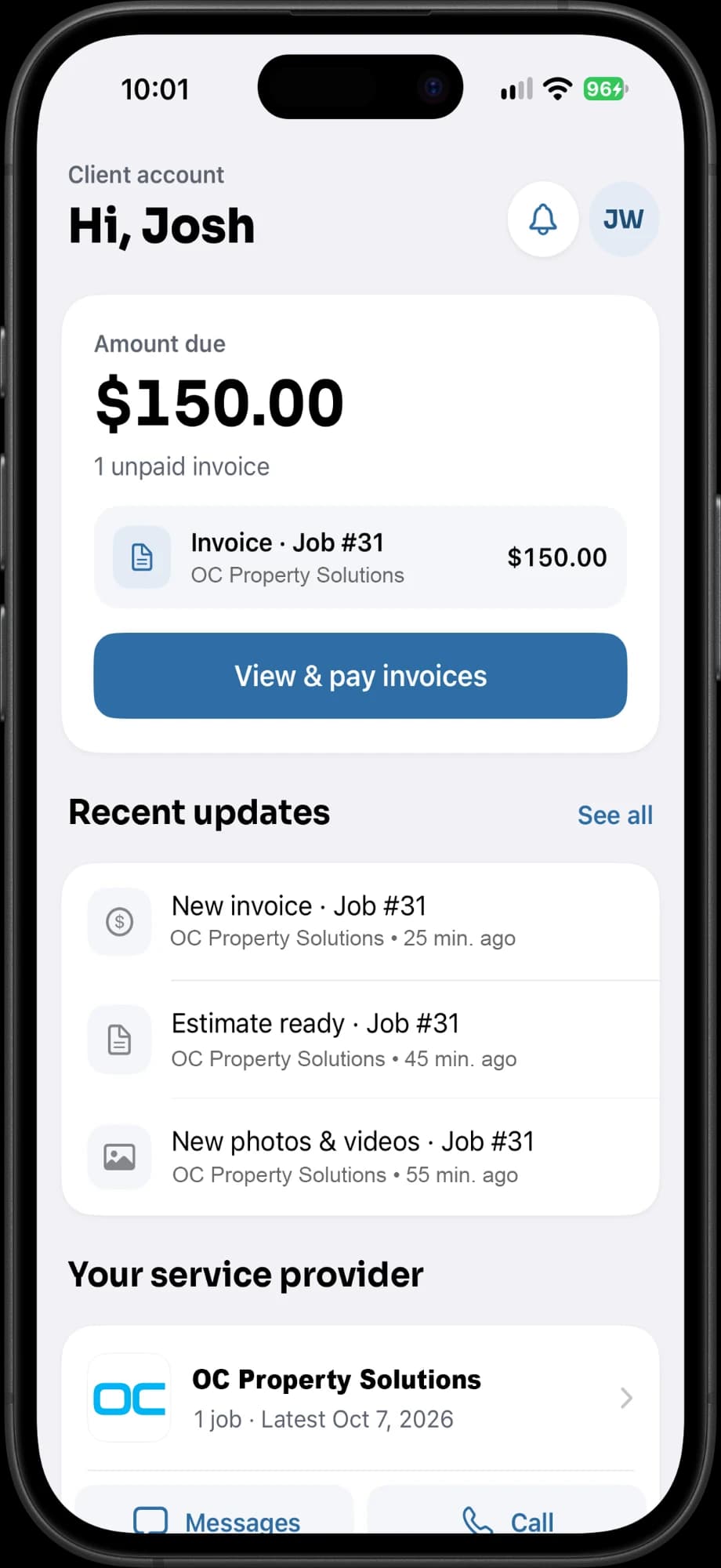
- OfficeSchedules & invoices
- CrewPhotos, time & chat
- ClientsClient portal
Price comparison
The tools your crew needs shouldn't cost hundreds every month.
Housecall Pro bundles users and features into multiple subscription tiers. FieldOpsPro keeps it simple: $10 per user per month with every FieldOpsPro feature included.
A 5-person crew, per month
 FieldOpsPro
$50/month
5 users × $10/user
- Every FieldOpsPro feature
- Month-to-month, no feature tiers
- 14-day free trial, no credit card
Housecall Pro Essentials
$149/month equivalent
Based on annual billing
- Up to 5 users included
- Annual plan: $1,788 billed once a year
- $189/month when billed monthly[1]
Save $99 every month.
About 66% less with FieldOpsPro.
Compared with Housecall Pro Essentials at $149/month, the monthly equivalent of its annual plan. Billed month to month, Essentials is $189/month, a $139 monthly difference.
Every year
$1,188
back in your business
- FieldOpsPro
- Housecall Pro
| Team size | FieldOpsPro | Housecall Pro | FieldOpsPro saves |
|---|---|---|---|
| 1 user, vs. Basic | $10 per month | $59 per month | Save $49/mo (83%) |
| 5 users, vs. Essentials | $50 per month | $149 per month | Save $99/mo (66%) |
| 8 users, vs. MAX | $80 per month | $299 per month | Save $219/mo (73%) |
How we calculated this: Each team size is compared with the lowest-priced Housecall Pro plan built for that many users, at the number of users the plan includes: Basic for 1, Essentials for 5, and MAX for 8. Housecall Pro packages different features with each plan, so this compares price, not identical feature sets. Full methodology
Feature comparison
FieldOpsPro vs. Housecall Pro
Two ways to run a field service business. Both cover the daily work of scheduling, documenting, invoicing, and getting paid. Housecall Pro adds a much larger set of business tools across its plans and add-ons. FieldOpsPro puts the core in one plan.
- Included
- Limited or plan-dependent
- Paid add-on
Last verified October 8, 2026 · Sources
| Feature | FieldOpsPro$10/user/month, every feature | Housecall ProPlan or add-on noted where it applies |
|---|---|---|
| Job management and scheduling | ||
| Job scheduling | Included: Day, week, and month calendar on the web; each crew member's jobs in the app | Included: Scheduling and dispatch on every plan[1] |
| Crew assignments | Included: Assign one or more crew members to any job | Included: Assign techs to jobs and appointments[1] |
| Recurring jobs | Included: Jobs that repeat weekly or monthly | Included: Recurring jobs on web and mobile[3] |
| Dispatch | Included: Assign the crew from the job; newly assigned crew get a push notification | Included: Included, with a broader dispatch toolset; routes and GPS tracking on higher plans[1] |
| Field documentation | ||
| Job photos | Included: Timestamped photos, organized on the job automatically | Included: Photo capture and upload to jobs[4] |
| Video documentation | Included: Video capture on every account, synced to the job | Paid add-on: Video uploads supported; the Help Center lists them as a paid HCP Cam add-on feature[4] |
| Photo markup | Included: Draw, add text, and stamp arrows, circles, and boxes in the app | Limited or plan-dependent: Photo annotations listed on Essentials and up; the Help Center also ties them to HCP Cam[1] |
| PDF photo reports | Included: Photo reports with your logo, sections, and captions | Limited or plan-dependent: Photo reports on Essentials and up, built on the web[5] |
| Gallery links | Included: Web gallery links for selected photos or a whole job | Limited or plan-dependent: Photo and document links to customers; job attachment links expire after 7 days[6] |
| AI tools | Included: AI voice notes, video walkthrough summaries, and an AI document scanner | Included: AI team on every plan (analyst, coach, marketing, help); AI call answering is a paid add-on[7] |
| Crew management | ||
| Employee time tracking | Included: GPS-stamped clock-in and clock-out, with timesheets | Included: Clock in and out in the mobile app; timesheets for managers[8] |
| Team communication | Included: Group and direct chat with built-in translation, in the mobile apps | Included: Employee and customer chat on web and mobile, every plan[9] |
| Client experience | ||
| Client portal | Included: Every account: jobs, shared photos and videos, estimates, invoices, and billing | Included: Appointments, estimate approval, invoices and payments, and booking[10] |
| Client communication | Included: Portal messaging in the mobile apps; estimates, invoices, and job confirmations by text and email | Included: Text and email notifications, On My Way texts, and a two-way text inbox[11] |
| Estimates, invoices, and payments | ||
| Estimates | Included: Estimates with optional line items, deposits, and expiry dates | Included: Estimates and quotes on every plan[1] |
| Customer approval | Included: Customers approve or decline online; approved estimates become invoices | Included: Online approval with e-signatures[12] |
| Invoices | Included: Send from the job by text, email, or link | Included: Invoices with automated reminders[1] |
| Online payments | Included: Card payments through your connected Stripe or Square account | Included: Built-in card and bank payments, plus Tap to Pay[13] |
| Price book | Included: Saved items and bundled packages for estimates and invoices | Included: Price book on every plan; flat-rate pricing on Essentials and up[14] |
| Plans and platform | ||
| Apps | Included: iPhone, Android, and a web app for the office | Included: iOS and Android apps, plus the web app[1] |
| Free trial | Included: 14 days, every feature, no credit card required | Included: 14 days on MAX, no credit card required[1] |
| Pricing structure | $10 per user/month. One plan, every feature, month to month. | Three plans: Basic $59 (1 user), Essentials $149 (5 users), MAX $299 (8 users) per month billed annually; $79, $189, and $329 billed monthly. Add-ons sold separately[1] |
Housecall Pro also sells tools beyond these everyday workflows, such as route optimization, live GPS tracking, job costing, QuickBooks sync, review management, consumer financing, an open API, and marketing and phone add-ons[1]. The difference is what comes in one plan: FieldOpsPro puts the tools crews use every day in one app at one per-user price.
A fair comparison
You may not need everything Housecall Pro sells.
Housecall Pro is a strong choice for businesses that want an extensive home-service platform with route optimization, marketing, review management, financing, QuickBooks integration, flat-rate pricing, API access, and other business-management tools.
But if your crew mainly needs the everyday tools listed here, FieldOpsPro gives you those core workflows without putting your business on a $149–$299/month software plan.
Start free. No credit card.
If your crew mainly needs to…
- Schedule jobs
- Dispatch workers
- Document work
- Capture photos and video
- Create reports
- Track employee hours
- Communicate with customers
- Communicate with the crew
- Send estimates
- Send invoices
- Collect payments
…every one of those is in FieldOpsPro, on every account, for $10 per user per month.
Built around the field
Stop paying for software your crew doesn't use.
Your technicians shouldn't need to understand a giant business platform just to see today's jobs, take photos, clock their hours, leave notes, and finish paperwork. FieldOpsPro was built around what happens in the field.
Start the day
- See today's schedule
- Know where to go
- See the job details
- Clock in
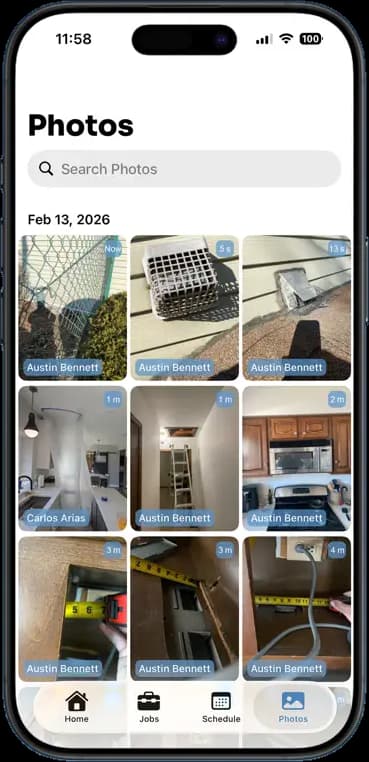
Document the job
- Capture photos
- Record video
- Add voice notes
- Mark up problems
- Store documents
- Update the rest of the crew
Finish the job
- Build reports
- Create estimates
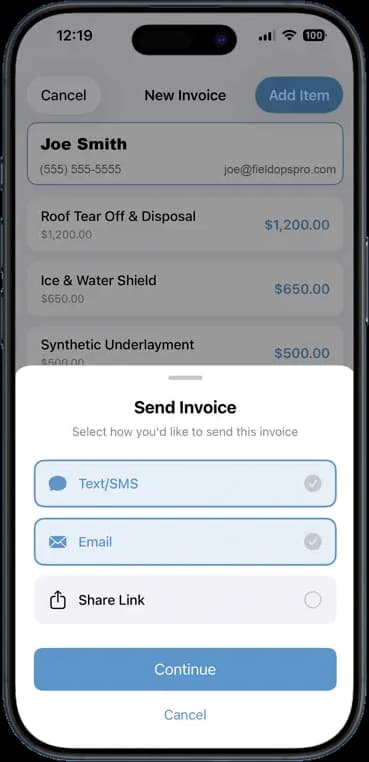
- Send invoices
- Share with the customer
- Get paid
Savings calculator
What Would Your Crew Pay?
Pick your team size. We'll compare FieldOpsPro with the Housecall Pro plan your crew would need, using Housecall Pro's published prices.
Your team size
FieldOpsPro
$50/mo
5 users × $10, billed monthly
Housecall Pro Essentials
$149/mo
Essentials plan, up to 5 users, billed annually
Your crew could save
$99/mo
66% lessThat's $1,188 a year.
Estimates only. Each team size uses the cheapest Housecall Pro plan that holds it: Basic for 1 user ($59/month billed annually or $79 billed monthly), Essentials for up to 5 ($149 or $189), and MAX for up to 8 ($299 or $329), plus $35/month for each additional MAX user. Plans include different features, taxes and add-ons are not included, and annual figures are monthly equivalents of a yearly charge.
No credit card required. No contracts. Cancel anytime.
Choosing
Which One Is Right for You?
Both are good software. They're built for different businesses.
FieldOpsPro may be the better fit if…
- You run a small or midsize crew.
- You want straightforward scheduling and job management.
- Jobsite photo and video documentation matters.
- You want reports, markup, and client sharing.
- You need timesheets.
- You send estimates and invoices.
- You want your clients connected.
- You want predictable per-user pricing.
- You don't want to pay for a large business-management ecosystem.
Housecall Pro may be the better fit if…
- You specifically need its advanced home-service ecosystem.
- You rely on QuickBooks integration.
- You need route optimization.
- You want customers booking themselves online from your website or Google.
- You want built-in review-management tools.
- You need consumer financing.
- You want sophisticated price-book and flat-rate pricing tools.
- You need the MAX plan's open API.
- You need Housecall Pro's marketing, voice, or service-plan products.
Try FieldOpsPro FreeThe right software isn't the one with the longest feature list. It's the one your crew will actually use.
14 days free · No credit card required
Built for the trades
Built for the People Doing the Work
Home service and construction crews with a few people to a couple dozen, who want the office, the field, and the customer working from the same job.






Don't see your trade? See every trade FieldOpsPro serves.
FAQ
Questions About Switching From Housecall Pro
Is FieldOpsPro a good alternative to Housecall Pro?
For many contractors, yes. FieldOpsPro is a strong alternative if your crew mainly needs job management, scheduling, field documentation, employee time tracking, team and client communication, estimates, and invoicing, without Housecall Pro's broader and more expensive set of business tools. If your business relies on Housecall Pro-specific functionality such as QuickBooks integration, route optimization, review management, consumer financing, API access, marketing, or its phone system, check those requirements before you switch. Compare the features side by side.
How much does FieldOpsPro cost compared with Housecall Pro?
FieldOpsPro is $10 per user per month, billed monthly, with every feature included. Housecall Pro sells three plans, priced as monthly equivalents of annual billing: Basic at $59 a month with 1 user included ($79 billed monthly), Essentials at $149 a month with 5 users included ($189 billed monthly), MAX at $299 a month with 8 users included ($329 billed monthly). For a 5-person crew, that is $50 a month with FieldOpsPro versus $149 a month for Housecall Pro Essentials on annual billing. Housecall Pro's plans include different features, so this compares price, not identical feature sets. Housecall Pro prices as published on October 8, 2026. See what your crew would pay.
Does FieldOpsPro have scheduling and dispatch?
Yes. The office plans the crew's work in day, week, and month calendar views in the web app, and each crew member sees their jobs for the day in the iPhone or Android app. Assign one or more crew members to each job, set jobs to repeat weekly or monthly, and crew members get a push notification when they are assigned. Tap a job's address to open directions in your maps app. FieldOpsPro does not offer route optimization or a drag-and-drop dispatch board. See how job scheduling works.
Does FieldOpsPro support photos and videos?
Yes, on every account. Your crew captures photos and videos in the app, stamped with the time and location, and they sync to the right job on their own, even after a stretch without signal. Mark up photos with drawings, text, and shapes, then share them as a PDF photo report, a web gallery link, or through the client portal. See photo and video sync, photo markup, and photo exports.
Does FieldOpsPro have a client portal?
Yes. Every FieldOpsPro account includes a client portal at no extra cost. Your customers sign up with the email address on their customer record to see their jobs, the photos and videos you choose to share, and their estimates and invoices. They can approve estimates, pay invoices online once you connect a payment account, and message your company from the FieldOpsPro iPhone or Android app. You decide which jobs and photos they see.
Does FieldOpsPro have estimates and invoicing?
Yes. Build estimates and invoices on your phone or computer, pull in items from your price book, and send them by text or email. Customers approve estimates online, and an approved estimate turns into an invoice without retyping. Invoicing works through your connected Stripe or Square account, so customers can pay by card online. See invoicing and estimates.
Does FieldOpsPro track employee time?
Yes. Crew members clock in and out from the app, with GPS recorded at clock-in and clock-out, and their hours land on timesheets the office can review and edit in the web app. FieldOpsPro does not offer live location tracking. See the home dashboard.
Does Housecall Pro have features FieldOpsPro doesn't?
Yes. Housecall Pro offers route optimization, live employee GPS tracking, self-serve online booking, e-signatures on estimates, QuickBooks Online sync, job costing, flat-rate pricing, review management, consumer financing, an open API on its MAX plan, a sales proposal tool, recurring service plans, and paid add-ons for marketing campaigns and a business phone system. FieldOpsPro does not try to reproduce every one of those. It focuses on the work most crews do every day, from the schedule and job photos to timesheets, the client portal, estimates, invoices, and payments, and includes all of it in one plan.
Can I try FieldOpsPro without a credit card?
Yes. The 14-day free trial includes every feature and does not require a credit card. If you decide to stay, it is $10 per user per month with no contract, and you can cancel anytime. Start your free trial.
Run the Crew Without the Big-Software Bill.
Scheduling. Photos. Videos. Reports. Timesheets. Clients. Estimates. Invoices.
One app. One plan. $10 per user/month.
No credit card required. No contracts. Cancel anytime.
Sources and methodology
Comparison last verified on against Housecall Pro's published pricing page, feature pages, and Help Center.
- [1] Housecall Pro pricing and plans
- [2] Housecall Pro Help Center: Billing and account management
- [3] Housecall Pro Help Center: Create a recurring job
- [4] Housecall Pro Help Center: Capture and upload photos & videos on mobile
- [5] Housecall Pro Help Center: Photo report on jobs
- [6] Housecall Pro Help Center: Attachments: send customers photos & documents
- [7] Housecall Pro Help Center: AI team overview
- [8] Housecall Pro Help Center: Time tracking overview guide
- [9] Housecall Pro: Chat
- [10] Housecall Pro Help Center: Using the customer portal
- [11] Housecall Pro Help Center: Customer notifications overview
- [12] Housecall Pro Help Center: E-signatures on estimates
- [13] Housecall Pro Help Center: Payment processing options
- [14] Housecall Pro Help Center: Flat rate pricing overview
Housecall Pro figures are monthly equivalents of annual billing: Basic $59/month with 1 user included, Essentials $149/month with 5 users, and MAX $299/month with 8 users. Billed month to month, the same plans are $79, $189, and $329/month. Each team size is compared with the cheapest Housecall Pro plan that holds it: Basic for 1 user, Essentials for 2–5, and MAX for 6–8. MAX lists additional users at $35/month each, shown the same under annual and monthly billing, and Housecall Pro's Help Center lists additional logins as available only on MAX, so teams larger than 8 are priced on MAX plus $35 per additional user. Housecall Pro packages different features into each plan, so the plans are not feature-for-feature equivalents of FieldOpsPro or of each other. FieldOpsPro is $10 per user per month, billed monthly, no annual contract, with a 14-day free trial. Taxes, payment processing fees, introductory offers, and add-ons excluded. Housecall Pro prices as published at housecallpro.com/pricing on October 8, 2026.
FieldOpsPro details reflect the product as of the same date. The camera, photo markup, AI tools, team chat, and client portal messaging are in the FieldOpsPro iPhone and Android apps; the calendar views are in the web app. Invoicing and online payments require a connected Stripe or Square account. Rows marked as not offered describe FieldOpsPro, not Housecall Pro.
Housecall Pro is a trademark of its respective owner. FieldOpsPro is not affiliated with or endorsed by Housecall Pro. Competitor pricing and features are based on publicly available information and may change.